Node-graph workbench
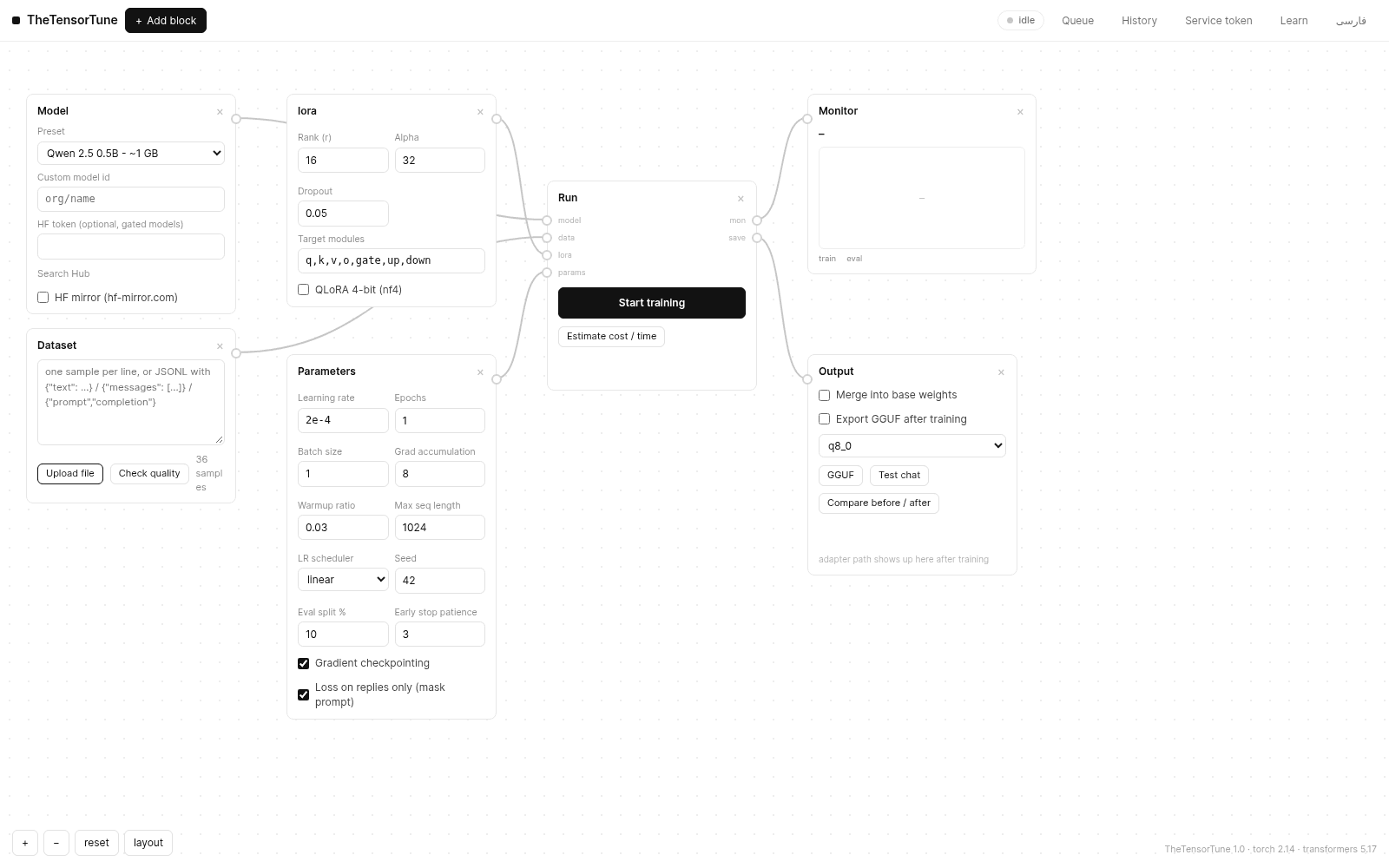
Model, dataset, LoRA, parameters, output — every stage is a draggable block on one canvas. Drag from a port to wire blocks together and the whole pipeline stays visible.
TheTensor presents · TheTensorTune v1.0
TheTensorTune is a workbench that runs on your machine. Bring a dataset, pick a model, train a LoRA adapter, chat with the result, compare it against the original, and export a GGUF file that runs in Ollama or llama.cpp. No account, no setup wizard, nothing leaves your computer.
Free under Apache-2.0 · Windows, macOS and Linux · Python 3.10+
Measured on a real run · v1.0
01 · What is this
TheTensorTune is a single Python file. You run it, and a workbench opens in your browser: a canvas where every stage of fine-tuning is a block you can drag and wire together. There is nothing to sign up for and no dashboard to configure. The app and your data stay on your machine.
The workflow is the standard one — it just does not make you live in a terminal. You bring the data and the app checks it before you train on it. You pick a model and a few settings; the defaults already make sense for a first run. Training runs in front of you, with a live loss chart instead of a pile of log text, and checkpoints are saved along the way.
When a run finishes, you can do the part most tools leave out: talk to the model you just made, put it next to the base model and see the difference in numbers and in words, then export it as one file that works in the tools people already use. The interface speaks English and Persian, and a twelve-lesson visual course is included in the app itself.
“If a step can be a block on a canvas instead of a command in a terminal, it should be.”
— the TheTensor dev log, entry #1
02 · What it does
Ten things TheTensorTune takes care of between “I have some data” and “my model runs in Ollama”.
Model, dataset, LoRA, parameters, output — every stage is a draggable block on one canvas. Drag from a port to wire blocks together and the whole pipeline stays visible.
Genuine PEFT training with checkpoints, resume and early stopping — not a mock. Start from a preset or type any Hugging Face model id.
One click shows sample counts, format mix, duplicates, detected languages and a length histogram, so bad data shows up before you waste a run on it.
Before you start, the estimator works out whether a run fits, how long it takes and what it costs, from your actual dataset and settings.
Stack several runs, watch step-by-step progress with live loss, cancel cleanly, and resume a stopped run from its checkpoint. Memory is freed between jobs.
Talk to your tuned model in a multi-turn chat, in Adapter, Merged or Base mode, so you can feel what training actually changed.
Perplexity and eval loss for the base and tuned model side by side, with the same prompt answered by both. The difference shows up in numbers and in words.
Merge and quantize to f16, q8_0 or K-quants. The exported file keeps its tokenizer and metadata, so replies match what you tested in the app.
Everything in the UI is also an API route. Async jobs can call a webhook when they finish, signed with HMAC-SHA256 so you can verify the sender.
A twelve-lesson visual course lives in the app, from your first dataset upload to API automation, in English and Persian.
03 · How you use it
This is the whole journey. Every step has a matching lesson in the Learn section, with the screenshots to go with it.
Paste text or upload a file: chat logs, prompt/completion pairs, or plain lines. Check quality shows what you are actually about to train on.
Start from a preset, search the Hugging Face Hub from inside the app, or type an org/name directly. Gated models take your token, and it stays in memory only.
Rank, alpha, learning rate, epochs — every setting is a field in a block, with defaults that work for a first run. Change them when you have a reason to.
Press Start and the loss chart draws itself in real time. Queue more runs, cancel, or pick a run back up from its checkpoint.
Talk to the model you just trained, then put it next to the base model: same prompt, both answers, perplexity side by side.
One click merges and quantizes to a GGUF file. Drop it into Ollama, llama.cpp or LM Studio and it runs.
04 · Screenshots
Every image below is a real screenshot from a live TheTensorTune 1.0 session — upload, training, chat, comparison and export all included.
05 · FAQ
Short answers, no hedging. The longer versions live in the blog section.
TheTensor · TheTensorTune v1.0
The zip holds one Python file and its docs. Install the libraries, run the file, and the workbench opens in your browser. Lesson 3 gets you to your first training run in a few minutes.
Free under Apache-2.0 · Windows, macOS and Linux · Python 3.10+