LoRA, plainly
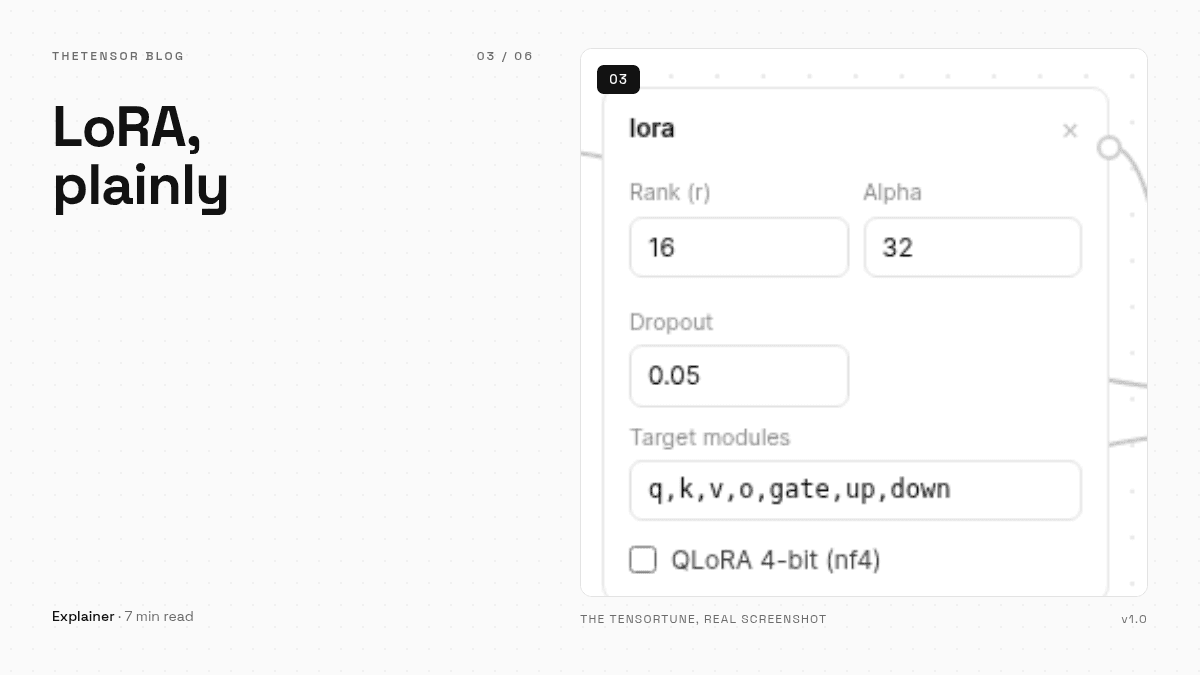
What LoRA actually does, minus the math headache: frozen base weights, a thin trainable overlay, and what rank, alpha, dropout and target layers each change — plus when QLoRA is worth it.
LoRA gets explained with matrices, rank decompositions, and a pile of notation. That is useful if you are implementing it and useless if you are trying to fine-tune a model this afternoon. Here is the working version, the one that fits next to the actual fields in the LoRA block.
The core idea in one paragraph
Full fine-tuning rewrites every weight in the model — billions of numbers, gigabytes of gradients. LoRA takes a different bet: freeze the original weights completely, and train a small pair of matrices alongside them whose product approximates the change you wanted. The model stays intact. Your training writes a thin overlay, and the overlay is the only thing that gets saved. That is why a LoRA run needs a fraction of the memory, and why the result is an adapter file measured in tens of megabytes rather than a full model copy.
Rank: how much the overlay can say
The rank (r) is the width of those matrices — the number of independent directions the overlay can express. Rank 8 gives you a compact overlay suited to tone, format and style shifts. Rank 16 to 32 buys room for richer behavior, at the cost of a bigger adapter and a bit more memory. On a small model with r=16 you are training roughly a few million parameters — around one percent of the model. That ratio is the whole trick: tiny overlay, base model untouched.
Alpha: how loudly it speaks
Alpha scales how strongly the overlay's contribution is mixed into the model's output. The community convention is alpha = 2 × r, which is why 8/16 and 16/32 pairs show up everywhere, ours included. The subtlety worth knowing: what matters is the ratio alpha / r, not either number alone. Keep the ratio around two and you will not go far wrong. The day you want to experiment, that is the dial you are turning.
Dropout and targets
Dropout (0.05 is a fine default) randomly silences parts of the overlay during training so it cannot memorize your dataset word for word. It earns its keep most on small datasets, which — realistically — is most datasets people fine-tune with.
Target layers decide where the overlay plugs in. The default set covers the attention projections (q, k, v, o) plus the MLP block (gate, up, down), which is the standard recipe and what TheTensorTune ships with. A narrower set trains faster but learns less; the default is the boring, reliable choice, and boring is a compliment in this field.
QLoRA: same idea, smaller box
QLoRA keeps everything above but loads the frozen base model in 4-bit (NF4) instead of full precision, so a model that needed a lot of memory fits in a fraction of it. You train the same overlay; the base just takes up less room while you do it. It ships as a toggle in the LoRA block rather than a default, because on small models the extra compression buys less than it costs. Turn it on when the model you want is bigger than the room you have.
That is LoRA without a single matrix: a rank number, a volume knob, a little dropout, and a sensible set of layers. Set r, double it for alpha, and spend your remaining attention on the dataset — which is where fine-tunes are actually won.